
The Settings Screen of the administrative / client.outreachcircle.com platform offers ways to adjust or view the following settings:
- General
- Supporter Recruitment
- Admins
- Integrations
- Plan and Billing
This FAQ goes over General Settings.
General
General Settings tells your OutreachCircle's status and allows you to set your visibility.
Status will be listed as either "Active" or "Inactive." This can be changed by editing the "About" Screen in your OutreachCircle.
Visibility can be set to "Public" or "Private" determines the methods by which the Supporter side can be discovered. All free OutreachCircles are set to Private by default.
| Discoverability |
Private |
Public |
| Recruitment Link | YES | YES |
| QR Code | YES | YES |
| Search by Code | YES | YES |
| Search by Name | NO | YES |
| Search by Location | NO | YES |
Additionally, OutreachCircle allows you to set an email address for your supporters to reply to. This gives you the ability to decide where you want to manage responses from your supporters, and it prevents emails from going to your admins' personal accounts.
In General Settings, the reply-to email can be set in "Reply-to Email."
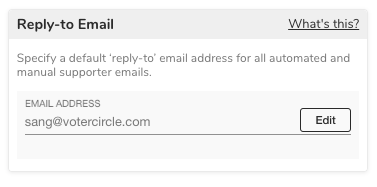
Click on the "Edit" button and enter the email you would like to set as your Reply-to Email. Then click "Save."
Comments
0 comments
Please sign in to leave a comment.