
How to set up a User Profile on the Client Platform
Creating an OutreachCircle User Profile is necessary if you want to be an Admin for any OutreachCircle Client Accounts.
Go to client.outreachcircle.com/user/signup.
If you already have a user account, click "Login here" at the top of the page and you can proceed to login to OutreachCircle. You can ignore the rest of this FAQ.
Otherwise, fill in your name, email address and password to create your profile. You can also sign up with a Google account.
Note: If you try to sign up with an email address that already is being used as an OutreachCircle email address, you will be prompted to log in. You cannot create more than one profile for a single email address.
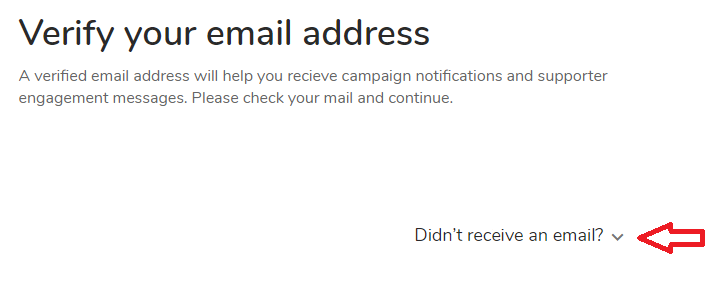
Once you've signed up, you will be sent a verification email from no-reply@outreachcircle.com. Go into that email and click the Verify Email Address button. After you verify your email address, you will continue to the Client Home Page.
If you do not receive an email, click the downward arrow next to "Didn't receive an email" and follow the instructions to get your account verified.
We recommend all admins attend our one-hour training course before doing admin work in OutreachCircle.
How to become an Admin for an OutreachCircle / Inviting an Admin:
When you create an OutreachCircle, you automatically become an "Admin" for it.
DO NOT Create duplicate OutreachCircles for different Admins.
DO Create a single OutreachCircle and invite multiple admins to it.
To invite another person to be an Admin for an OutreachCircle, sign into your client.outreachcircle.com account in which you are an Admin for that OutreachCircle. Choose the OutreachCircle to which you want to invite them and go to:
Settings -> Manage Admins -> Add Admin
Enter the name and email of the person you are inviting. The admin you invited will appear in the Admins section in a box that indicates they have been sent an invitation:
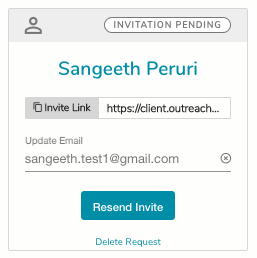
If any issues arise with the email invitation, you have a couple of other options available from the box above:
- Invite link - Give the person the invite link and they can connect and become an admin.
- Resend Invite will send the invitation email again.
- You can click the Delete Request link if you no longer wish for the person to become an Admin.
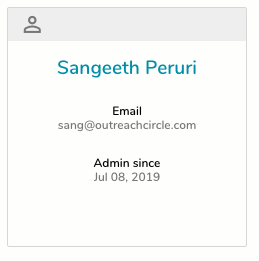
An invited admin must accept your invitation to gain their admin privileges. An email is sent to them asking them to accept. They will be prompted to make a user profile if they do not already have one. Your OutreachCircle, and all OutreachCircles they are admins for will appear on their "All OutreachCircles" Screen when they log in. Once the invitation is accepted, the box above will change to look like this:
Comments
0 comments
Please sign in to leave a comment.